I tend to stick to photography related topics on this blog so you might be wondering why a t-shirt review. Simple enough, Mike Small Photography is celebrating 2 successful years photographing real estate and architecture so I am upping the marketing game to the logical next step, t-shirts! Granted it is not as high tech as flashy internet ads that stalk you or say, sky writing, but it is a proven method of getting your name out to the masses. So I have jumped on board.
A while back I did a review of Easy Canvas Prints and was quite happy with the canvas print I got. So when I learned of their sister company AlliedShirts.com I figured that was a good place to start. Much like canvas printing, you can get you logo (or most anything) on a t-shirt at a 1000 places nowadays. But are you going to get quality printing as well as a quality t-shirt? It’s a crap shoot. So go with what you know and have worked with in the past or read the reviews! (You wouldn’t buy a $3000 camera without seeing what everyone is saying about it first. A t-shirt may be cheaper (way) but don’t go in blind.)
Shipping Time: I placed my order on Saturday, 11-23 and got a confirmation email that said “Thank you for your order! Your estimated delivery date is 12/11/2013.” (A confirmation is always nice, believe it or not there are still some companies that don’t send one). So that is a little more than a two week lead time, not too bad for a custom printed t-shirt with the standard, no-frills shipping. But the surprise, it arrived about 6 days after I ordered it. A week from start to finish is pretty fast turn around. No complaints with that. The only tiny negative, they did not send a shipping notice email to let me know it was on the way and with a tracking number; minor issue, not worth crying over.
Overall Product Quality: I ordered the Budget Short Sleeve T-Shirt (my marketing budget isn’t in the big leagues yet – yet!). That is a pre-shrunk 100% cotton shirt for about $20. (One note on price, the more you order the lower the per t-shirt price). My test for quality of a t-shirt is “can I see my hand through it”. In other words, is it thin, whispy fabric that reveals all and may last one wash but two is pushing it or will it hold up to the rigors of being worn and washed? The Allied Shirts budget t-shirt was a lot less budget quality than I might have thought. No seeing the hands or anything else through the fabric, seams look sturdy with no lose threads, overall I’m happy with the t-shirt quality.
Printing Quality: The image I had printed was my logo. I used a 300 dpi JPEG so I started with a quality image. (Note: their FAQs say you can print a photo too, I did not try that this time around but probably worth a try – remember start out with a high quality image). The image printed on a white t-shirt exactly as I would have expected. The colors were vibrant and true to the original. The text was clear and crisp. I feel that overall image quality is very good.
Final Rating: My final review of the t-shirt I received from AlliedShirts.com is five out of five cameras. Production and shipping time totaled about a week, fast for a custom order. The quality of the t-shirt was very good (I ordered the “budget”). The overall image quality was also very good. Bottom line, I would redommend Allied Shirts if you are looking for a way to market your business or you just want to create a one-of-a-kind shirt with your own art work. Would make a cool gift too.
Disclaimer - Allied Shirts gave a free t-shirt for reviewing purposes.
There are so many canvas print companies out there that at times it can seem overwhelming when trying to pick one to trust with your photographs. I have reviewed several other canvas printing companies in the past including Easy Canvas Prints, Arts Cow canvas prints, Canvas on Demand and ZaZa Prints. With only some exceptions I have been satisfied with the overall experience and quality of all of them. So in my continued quest for canvas prints I am adding another company to the list, Juno Prints.
One thing you will notice about Juno Prints right away upon visiting their website is the lack of clutter and straight forwardness of the site. You aren’t going to find 100s of products to select from or complicated pricing structures. It is just canvas prints and there are 15 sizes to select from. So if it is canvas you are looking for their approach can save you some confusion and the head ache experienced on other photo printing sites.
I ordered a 16″ x 24″ image wrap canvas print which sells for $55 + $5 shipping.
Shipping Time: I placed my order on a Thursday, and I received it on the following Thursday. So that was only eight days from start to finish. That was the shortest shipping time of all the canvas printers I have so far reviewed. Your shipping time may vary of course due to how far you are from their printing facility, so you’ll want to factor that in. The only “negative” I have is that they never sent an email notification that my order had shipped, it just showed up one day. It is not a deal breaker, but a little rare in this day-and-age of e-commerce. I’m used to getting progress updates.
Packaging: This being my 5th canvas print order from 5 different companies I have seen a range of methods for packaging canvas prints for shipping. Some pack it to survive a trip around the world and back with bubble wrap, extra corrugated and straps to make sure it doesn’t move an inch in transit. Juno Prints used a bit more of an economy packaging than some of the other companies. The canvas was in a plastic bag and then in what looks like a custom made corrugated box that has edge bumpers of sorts on the two ends to protect it. My print held up in shipping with no damage even through the corner of the box was crushed. In spite of the fact that their packaging is not as “beefy” as some other printers it did the trick and the canvas arrived unscathed.
Image Quality: I had the portrait above printed for this canvas. I felt there were a few minor, but noticeable, differences between the image as I see it on the screen and the final canvas print. Nothing earth shattering or even that would prevent me from ordering again from Juno Prints, but worth mentioning nevertheless. First, the image I sent had a depth of field such that the background from the child’s feet to the trees in the distance became progressively blurred. In the final canvas that seems to be more pronounced and the whole image, especially the “feet to the trees” area, is a fair amount more blurred than in the original image. It is a “softer” look on canvas than on screen and photo paper. Second, the over all image is a shade darker than the original. For this photograph these differences did not have a big impact on the end canvas print. In fact, they give it a bit more of a painting look. Overall the image looks good.
The Final Canvas Print
Overall Product Quality: The construction of the Juno Prints product is of high quality. The gallery wrapping is neat and tight with clean, crisp corners. The frame is solid and the canvas is secured to it well. Juno Prints also does something that I have not seen from any of the other canvas printers I have reviewed thus far. They add a backing to the stretched frame with built in hanging hardware. This gives is a nice clean look and really finishes it off nicely. Juno Prints uses “archival grade canvas, with UV resistant ink…” which should give you a canvas print that will stand up to time given proper care. In the end, overall product quality is very good and I am very satisfied with the construction and presentation of the stretched canvas.
Final Rating: Production and shipping time totaled about one week which was on the faster side compared to others. There was no shipping notification sent however. The packaging got the canvas to me in one piece in spite of some UPS “rough handling,” so that was good. The image quality was a bit “softer” and darker than I expected based on my original image but overall was still good. The construction of the frame and canvas quality were very good and the added touch of the backing is nice.
Want one for yourself? Juno Prints is offering readers of Shutter Mike a 15% discount on any canvas print order. Simply use coupon code zxnen at checkout. But hurry, this offer expires October1, 2012.
Note: Juno Prints provided this canvas print free of charge in exchange for this review.
When digital photography started to take off and almost everyone started to have a digital camera an off-shoot industry started to take root as well; the photo printing industry. Today it is a huge business and you can have your photographs printed on almost anything. Canvas prints are very popular but they are just the beginning. If it can be printed on, someone is undoubtedly offering to print your photos on it. I have tried and reviewed several of the canvas printers and was generally happy with the results of all of them. But I had never tried printing on any of the other media that is available until recently.
ZaZa Gallery, known for their high quality canvas prints – see my review of their prints – has expanded to include tile coasters printed with your photographs. So I figured I would give it a try, selected 4 of my favorite photographs and ordered a set of 4. They arrived the other day so I figured I’d share my thoughts.
Shipping Time: No complaints here on the shipping time. We’re not talking Amazon fast where you have it almost before you ordered it, but completely reasonable time frame. It took a few days to process the order and I had it 2 days after I got notification that it had shipped. So about a week from ordering to having it in hand is not too bad.
Packaging: Everything arrived safe and sound. The tiles were in bubble wrap bags and securely taped to cardboard to avoid movement during shipment. It is obvious thought went into the packaging process to make sure the product got to the end destination without incident. So I think you can be confident you won’t receive a box of tile dust.
Image Quality: Image quality is directly related to the quality of the image you submit to be printed. I submitted 4 sunset scenes that I had taken around the country. Three of the four tiles turned out amazing. Great color and detail. I was very happy with the results. The fourth tile was a victim of my image quality. It was a darker image and had more noise than I initially realized. So although it came out perfectly acceptable it doesn’t look as nice as the others. Lesson learned (and passed on to you) – make sure you are sending your best quality, high resolution, low noise images. The end results can be fantastic, but you have to start out with quality image files.
Overall Product Quality: The 4″ x 4″ tile coaster from ZaZa Gallery is a high quality product. The tiles are marble and coated with a shinny surface to protect the image and make it perfect for a sweating ice tea on a summer day. They are also backed in cork to protect your table tops (the purpose of a coaster of course). You get a really quality product that with the right photographs can look like something you would pick up in a gift shop or department store. I don’t think you’ll be disappointed.
Final Rating: the end result is I think these tile coasters are worth the 5 out of 5 cameras rating. Shipping time is perfectly reasonable for a custom order item such as these. They are securely packed for safe shipping to your door. And most important, the quality of the tiles and the printing are high. You can definitely get photo coasters cheaper. But they are usually not on tiles and you do risk the quality issue. So for something built to last and that can be something you display on your end table, not hide in the drawer until the drinks come out, these are a great choice.
Before I took an architectural photography workshop in LA last month I did not know this little gadget even existed. But one of my fellow photographers had one and I quickly added it to my “must have” list of photography gadgets.
There are several varieties of hot shoe bubble levels available. Button, two axis and three axis are the most common. You can also find them from numerous manufactures and at numerous price points. On the high end they go can go for about $35 and all the way down to $6-7 for a low end one.
These are great for architectural and landscape photography. They allow you that extra bit of confidence that your horizon or building is straight, saving post-processing time or worse a ruined photograph.
There are a few pros and cons of the hot shoe bubble level of course. Lets get the cons out of the way first.
Cons:
As the name suggests, this device slips on to the hot shoe of your camera, where the flash goes. So obviously you cannot use this with a flash.
It really is only useful for tripod photography, which most architectural and landscape photography is anyway. But as you can imagine, if you are looking through the view finder you can’t see the level on the top of the camera and if you move to see it you lose your composition.
Beware of the cheap versions. That generally goes without saying for most anything. Although the one I bought works great, I have seen complaints that some of the low priced ones are not calibrated right and do not give accurate readings. Your photographs are probably worth investing a little more for the better quality.
Pay attention to what you are buying. This may not impact most people. But for Sony Alpha users the hot shoe is the reverse configuration of most other camera brands, Canon and Nik0n. So when the description says “fits all standard SLR/DSLR hot shoes,” know that yours is not standard. You need one made specifically for Sony Alpha.
Pros:
Level photographs nearly every time. This is such a simple little gadget but for those of us who have a hard time keeping that horizon straight this really does save a lot of post processing. Bottom line, it works (see #3 above of course).
Go for the triple axis. I have not used the button type or a two axis variety, but for a few more dollars the versatility of the three axes (I looked it up, that is the plural of axis) is well wroth it. You can double and triple check your layout and make sure you are getting a level shot in all ways. It is also great for when you change your camera orientation from horizontal to vertical.
I can only speak for the one I bought, the Polaroid Triple Axis Bubble Level, but this one is well constructed. The bubbles are truly level and the plastic housing is durable and well constructed.
Again, only speaking for the one I bought, the price was great. I’m not sure what you might get for 3 times the price, but at $9.99 through Amazon this was a good deal.
Overall, I definitely recommend getting one of these if you shoot architecture and/or landscapes. It is an inexpensive little gadget that gives a lot of value and that little bit of help to make sure everything turns out right after you have clicked that shutter. A tool worth having in your camera bag.
If you have a DSLR camera you quickly learn that dirt and dust are not your camera’s friends. The consequences of dust on the sensor can range from annoying spots on your images to a damaged sensor depending on it s severity. So like all electronic equipment, you want to make sure you keep your sensor and the camera as a whole clean.
Many higher end DSLR cameras have a mechanism to shake dust off the sensor. But it is almost a guarantee that at some point you are going to get dust on the sensor that the camera can’t dispose of on its own. You are also going to get other parts of the camera, like the lenses and LCD screen, dirty just from day-to-day use. So a small investment in some cleaning tools will go a long way to keep you and your camera happy.
I recently purchased two such tools. The first is a Giottos Rocket Air Blaster. I got the large version in black, but you can go for some color in your life and get red too or for those with limited space there is a small version as well. Regardless of the color or size you chose I am certain you will not be disappointed in your purchase. For an investment of about $10 this is a powerful little tool. It far surpasses those little blowers with a brush on the end that often come in camera kits. And it is far safer than canned air, which is a DSLR no-no by the way. For DSLRs with a cleaning mode where the mirror is flipped up to allow you to blow dust off the sensor the Rocket Air Blaster makes quick work of this task. It also does wonders on getting pug hair out of your keyboard, should that be a problem that plaques you.
Second tool I bought is a LensPEN Lens Cleaning System. This will set you back another $10 or so but like the sir blaster, so worth it. I’m not sure what a “patented carbon compound” is (here’s where paying more attention in Chemistry 101 would have come in handy) but I can tell you it works. The carbon compound end of the pen has a cap over it, like a pen, and removes fingerprints and smudges from your lenses way better than then micro-fiber clothes or lens tissue. The other end of the pen is a brush that slides out and is perfect for keeping the surface of your camera dust free. Very handy little tool that easily fits in any camera bag.
To make your camera even more happy check back tomorrow for some keeps on keeping your camera dust and dirt free in the first place. Or if not dust free, less dusty.
I gave the “teaser” last month about my new camera bag. Now that I have been using it for almost a month I’ll give my full assessment and review. But be forewarned, I love, love, love this bag, so I don’t have too much to say on the negative side.
Why the Crumpler? I have several camera bags but not one that fit two criteria I really wanted in my next camera bag. 1) I wanted a bag that would hold my iPad but was not designed to hold a laptop as those tend to be much bigger. 2) I wanted an over the shoulder, messenger style bag. I did my online shopping and review reading and there were a few bags that fit the bill. But the Crumpler 7 Million Dollar Home won out based on its styling and the reviews I had read (and watched).
What I love about this bag;
1) The style: It comes in several color combinations but I went with the orange and brown (with a blue interior). I liked the way it looked online and was very satisfied with it in person as well. The messenger bag style of the bag is also great. It does not appear to be a camera bag which can be great for not attracting “hey look at me, I’m carrying $1000s of camera equipment” attention. This style of bag also keeps it right at your side so the camera is in easy reach whenever you need it unlike a back pack camera bag.
2) Roominess: The Crumpler design makes very good use of space. It does not look that big on the outside, but I manage to pack quite a lot into this bag and still have room for more. It also comes with several different sizes and shapes of movable dividers. So whatever your equipment you can configure the Crumpler to fit your stuff. In my bag I have:
Sony Alpha 850 with a battery grip and lens attached
External flash
5 additional lenses (for a total of 6) including: 12-24 mm, 50 mm prime, 28 mm prime, 100-300 mm, and 18-70 mm
3 extra batteries
4 compact flash cards
remote shutter release
and an iPad
3) Construction: I mentioned this bag looks good. As important as that is it doesn’t matter too much if the bag isn’t constructed well. But Crumpler has that covered. The 7 Million Dollar Home is a durable camera bag. Although it is not the bag I would chose for a rugged outdoor adventure, for urban adventures and standard airport to cab to hotel travel it is ideal. The Velcro closures holds things shut tight yet keeps it easy to open when an unexpected shot pops up. The adjustable strap is extra comfortable with its cushioned shoulder strap. Finally, it holds its shape, even when empty. This bag doesn’t collapse flat when empty which makes it easy to pack and return your camera to its secure spot after shooting.
4) Any Cons? I am hard pressed to find something about this bag I don’t like. The Crumpler is not an expensive bag. At $142 it is a bit of an investment, but it is also a great example of the “you get what you pay for” cliche. I think I just turned that con into a pro. For that price you might consider that the Crumpler is limited to where you will want to use it a negative. As I mentioned this is probably not the bag you want to use for your nature photo shoots out in the woods. It is water resistant, but not water-proof.
Bottom line – great style, well constructed, and holds everything you will need. It is pricey and not an all around every-use bag. But if you can save up for it you’ll have a great investment and you can buy a cheaper bag for your outdoor photo shoots.
As the hobby of photography continues to grow and as digital point-and-shoot, DSLR and even mobile phone cameras become commonplace in most households amateur photographers are always looking for unique and creative ways to display their photography. The 4×6 print in an album just doesn’t cut it anymore. Countless companies have popped up on the web with photo printing on everything from mugs to t-shirts even pillow cases. And as you can imagine, the quality varies as much as the pricing from company to company. Photo key chains and mouse pads can be a cute novelty display of your photographic talents. But one method of printing your images for display that is becoming ever more popular and affordable is canvas photo prints.
A canvas photo print is just as it sounds, your photography printed on artist canvas, think PBS’s Bob Ross painting a happy little tree type canvas. This method of printing photography, when done well, makes an image appear like a work of art. Of course you generally have to start out with a quality photograph. Composed well, interesting subject and such. Although many of the canvas photo printers out there today will do image correction for you, they haven’t invented the post-processing software yet that fixes a boring photograph.
You can get a photo printed on canvas everywhere from Costco to well known online photo printers like Shutterfly to smaller specialty printers. So how do you know who to chose and who can print a quality final canvas print versus those that crank out mediocre “mass-produced” prints that you would not want hanging on your closet wall much less over the sofa? Read the reviews!
I recently got a canvas print from Easy Canvas Prints, one of the online specialty canvas printers – in that canvas prints is all they do, no photo dog tags or place mats here. Here are my thoughts on Easy Canvas Prints as one of your options when considering who to turn your next photographic masterpiece into something you can hang on your wall to oooh and ahhh the neighbors.
Shipping Time: I placed my order on a Wednesday, it shipped on Friday and I received it on Tuesday. Seven days from start to finish is pretty fast turn around. If you take out that weekend from the shipping equation it was only a 2 day shipping time. No complaints with that.
Packaging: Easy Canvas Prints’ packaging is something a lot of companies can take lessons from. Bottom line, they took great pains to make sure the product was going to make it to me in one piece and without any scratches or dents. We all know UPS and FedEx can get a little “careless” transporting a package cross-country – it happens going from truck to plane to truck to doorstep. But what Easy Canvas Prints has done is to first wrap the canvas in stretch film, then in bubble wrap, then they sort-of suspend it in the middle of any over-sized box. This method of packaging means that even if it does get dropped or crushed chances are good the canvas inside will make it through unscathed.
Image Quality: The image I had printed was black and white. So first off I cannot comment on the “true to color” aspect of Easy Canvas Prints. But we can do some inferring based on the image quality of the canvas I received. As is the nature of computer monitors, without calibrating and all that fancy stuff, no two are going to display an image exactly the same. So you have to understand that what you see on your screen is not what the printer will see on their screen (exactly). So expect some variation in the final product compared to how it looked on your monitor. What sets a good printer apart from a great printer is their ability to minimize this variation and get your final print as close to “reality” as possible. My print came out darker than I saw it on my monitor with the grays more pronounced. But in the end, the image was sharp, the tones of black and white were defined and I feel that overall image quality is very good.
Overall Product Quality: Easy Canvas prints uses archival inks (not the non-water proof inks some canvas printers use) and cotton-based material for the canvas itself. The construction of the frame is solid and the canvas is secured to the frame well with plenty of staples. Product quality is top notch and these canvas prints should hang over your sofa (or wherever you choose to place it) for a long time.
Final Rating: My final review of the canvas print I received from Easy Canvas Prints is five out of five cameras. Production and shipping time totaled about a week, including weekends. The packaging made sure nothing was going to damage the canvas on its trip to me. The overall image quality and the construction of the frame were very good. So if you are looking for something a little different than a standard photo paper print to hang on your wall, canvas prints are a great option. And of all the possible printers out there Easy Canvas Prints produces a quality product that you are likely to be very satisfied with.
Disclaimer - Easy Canvas Prints gave a free canvas print for reviewing purposes.
One problem I have had with my photography, that I have never quite been able to correct no matter how much on concentrate on it before clicking the shutter, is a slightly skewed image. My horizon is just slightly off at an angel. I am not sure if I ever so slightly shift the camera when I click or if I never get it perfectly straight to begin with. But whatever the cause it has resulted in me having to go through the additional steps in PhotoShop to rotate the image and then adjust or crop of the extra white space this causes around the edges. It is not a big deal, but a minor frustration that I was not sure how to correct until recently.
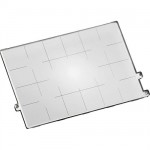
I was reading Adrian Schulz’s Architectural Photography(side note: this problem can be particularly noticeable in architectural photography because the horizon and parallel lines in the structures are so important to the overall image) and he mentioned a device called a “grid screen” (or focus screen) – page 37 if you’re interested. In the simplest terms, the focusing screen is the piece in the camera that allows you to view what the lens sees through the view finder. They are often etched with lines or guides that are then visible as an overlay on top of the image as you view it through the view finder. I had known that some cameras had grid lines when you look through the viewfinder to help with composition (think rule of thirds). But I did not know that on many DSLR cameras the focusing screen was interchangeable. But a quick search on my favorite camera supply site, B & H Photo, revealed that for my camera, the Sony Alpha 850 DSLR, the focus screen was indeed interchangeable and a grid version was available.
For just over $30 (free shipping too) I ordered the Gridded Type L Focusing Screen. (Note: I have seen these for as much as $56 elsewhere – yikes) This is such a simple solution to the tilted image problem I was having I cannot believe I never came across it before or did not search it out. But once I switched out my standard screen with the gridded screen I instantly had multiple points to reference to make sure everything lined up just right before I click the shutter. Is it a crutch? Maybe, but I look at it more as a tool to help me do my job better -a “work smarter, not harder” thing.
I do have a few tips on installing one of these based on my own experience.
1) Steady hands are important. The screen comes as a kit with a storage case and a specially designed tweezers to remove one screen and install the other. But they are tiny parts and you have to be very careful not to touch the mirror or the sensor in the process. So no coffee immediately before the operation.
2) Make sure you are doing the switch in as clean and dust free of an environment as possible. For one you are working on your camera with the lens off so you wan tot keep dust off your sensor. And two, anything that gets on the focus screen will show in your view finder. I peak from experience here. I had to do this twice because I got a speck of something on the screen and although not on the images it was very obvious through the view finder.
3) Watch the very detailed and well done video below. It is for making the switch in a Sony Alpha 900 or 850 but there are similar videos out there for Canon, Nikon, etc.
I think I have become a bit of a collector of camera bags, on a small scale at least. I am up to four bags, but in my defense, each serves a unique purpose. My latest acquisition was the Crumpler 7 Million Dollar Home Camera Messenger Bag. I just got it the other day and have not had an opportunity to do much beyond transfer my equipment into it. My initial thoughts are “very roomy” and love the style. But I will post a full review once I have had a chance to take it on a few shoots and test it out.
I’ll see if it lives up to the reasons I selected this particular bag as the next one in my collection and pass on the details of how it measures up.
1) Style – I wanted a messenger type bag both for the look and the easy access.
2) Space – I need the room to hold a lot of equipment.
3) Laptop vs iPad – I have a bag big enough for my laptop and one just for the camera. But I wanted something not as big as necessary for a laptop but still big enough for my iPad.
4) Versatility – I wanted a bag with lots of compartments, pockets and way to divide up the space.
So I’m going to take this bag out for a test drive this week and will report back my findings.
I need to make two slight clarifications to my Review of the 26 Blocks Show. My interpretation of Chris Loomis‘ photograph was a bit off. Joey Robert Parks, the creator of the 26 Blocks Project, filled me in on the details of how Chris accomplished this photograph. There was no camera “trickery” involved. Rather, a lot of forethought and planning to turn a vacant dirt lot into a work of art. Knowing the process behind this photograph brings about a new appreciation for the finished work for me.
What I said “appears” to be was indeed reality. The girl was in the lot and the “crop circles” were a photographer’s painstaking work to get the perfect shot. Very admirable. From Joey:
There is no photographic trick going on. The woman is not Photoshop. She’s actually standing there in the dirt lot. The crop circle took Chris seven hours to make. He did it all by himself.
I had also indicated that it appeared Chris Loomis had captured the image from high above. In fact it is not just appearances, it was taken from high above. Very high in fact. Again from Joey:
It *was* taken from high above. From a helicopter, in fact. How’d he get such a clear shot? He steadied the camera only with his hands. No mini-gyro stabilizing equipment used.
I stand by my original statement that “The artist saw what was and turned it into his own vision through photography.” But need to append it: “…through photography, creative vision and a lot of hard work.”
Thanks for clarifying Joey.
Read more about Chris Loomis’ Block E and the entire 26 Blocks project at 26blocks.com or in an article printed in the AZ Republic in May.
 I tend to stick to photography related topics on this blog so you might be wondering why a t-shirt review. Simple enough, Mike Small Photography is celebrating 2 successful years photographing real estate and architecture so I am upping the marketing game to the logical next step, t-shirts! Granted it is not as high tech as flashy internet ads that stalk you or say, sky writing, but it is a proven method of getting your name out to the masses. So I have jumped on board.
 I placed my order on Saturday, 11-23 and got a confirmation email that said “Thank you for your order! Your estimated delivery date is 12/11/2013.” (A confirmation is always nice, believe it or not there are still some companies that don’t send one). So that is a little more than a two week lead time, not too bad for a custom printed t-shirt with the standard, no-frills shipping. But the surprise, it arrived about 6 days after I ordered it. A week from start to finish is pretty fast turn around. No complaints with that. The only tiny negative, they did not send a shipping notice email to let me know it was on the way and with a tracking number; minor issue, not worth crying over.
 There are so many canvas print companies out there that at times it can seem overwhelming when trying to pick one to trust with your photographs. I have reviewed several other canvas printing companies in the past including
 Image Quality:
  The Final Canvas Print
 The construction of the Juno Prints product is of high quality. The gallery wrapping is neat and tight with clean, crisp corners. The frame is solid and the canvas is secured to it well. Juno Prints also does something that I have not seen from any of the other canvas printers I have reviewed thus far. They add a backing to the stretched frame with built in hanging hardware. This gives is a nice clean look and really finishes it off nicely. Juno Prints uses “archival grade canvas, with UV resistant ink…” which should give you a canvas print that will stand up to time given proper care. In the end, overall product quality is very good and I am very satisfied with the construction and presentation of the stretched canvas.
 When digital photography started to take off and almost everyone started to have a digital camera an off-shoot industry started to take root as well; the photo printing industry. Today it is a huge business and you can have your photographs printed on almost anything. Canvas prints are very popular but they are just the beginning. If it can be printed on, someone is undoubtedly offering to print your photos on it. I have tried and
  Before I took an

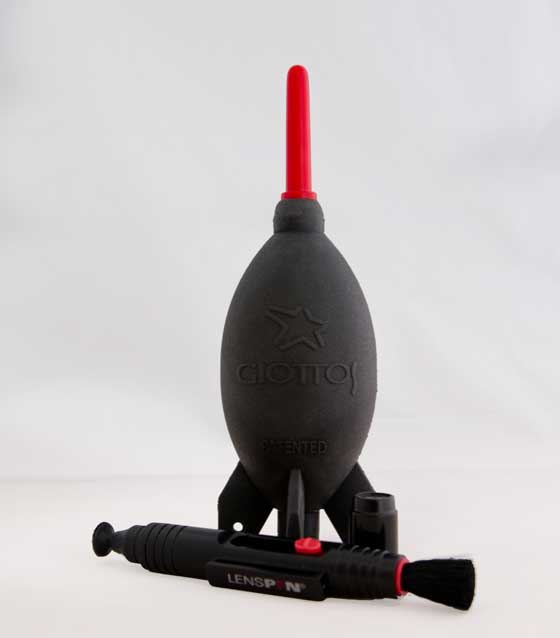
 I got the large version in black, but you can go for some color in your life and get
  too or for those with limited space there is a
  as well. Regardless of the color or size you chose I am certain you will not be disappointed in your purchase. For an investment of about $10 this is a powerful little tool. It far surpasses those little blowers with a brush on the end that often come in camera kits. And it is far safer than canned air, which is a DSLR no-no by the way. For DSLRs with a cleaning mode where the mirror is flipped up to allow you to blow dust off the sensor the Rocket Air Blaster makes quick work of this task. It also does wonders on getting pug hair out of your keyboard, should that be a problem that plaques you.
 . This will set you back another $10 or so but like the sir blaster, so worth it. I’m not sure what a “patented carbon compound” is (here’s where paying more attention in Chemistry 101 would have come in handy) but I can tell you it works. The carbon compound end of the pen has a cap over it, like a pen, and removes fingerprints and smudges from your lenses way better than then micro-fiber clothes or lens tissue. The other end of the pen is a brush that slides out and is perfect for keeping the surface of your camera dust free. Very handy little tool that easily fits in any camera bag.
 Why the Crumpler? I have several camera bags but not one that fit two criteria I really wanted in my next camera bag. 1) I wanted a bag that would hold my iPad but was not designed to hold a laptop as those tend to be much bigger. 2) I wanted an over the shoulder, messenger style bag. I did my online shopping and review reading and there were a few bags that fit the bill. But the
  2) Roominess: The Crumpler design makes very good use of space. It does not look that big on the outside, but I manage to pack quite a lot into this bag and still have room for more. It also comes with several different sizes and shapes of movable dividers. So whatever your equipment you can configure the Crumpler to fit your stuff. In my bag I have:
 As the hobby of photography continues to grow and as digital point-and-shoot, DSLR and even mobile phone cameras become commonplace in most households amateur photographers are always looking for unique and creative ways to display their photography. The 4×6 print in an album just doesn’t cut it anymore. Countless companies have popped up on the web with photo printing on everything from mugs to t-shirts even pillow cases. And as you can imagine, the quality varies as much as the pricing from company to company. Photo key chains and mouse pads can be a cute novelty display of your photographic talents. But one method of printing your images for display that is becoming ever more popular and affordable is
  (side note: this problem can be particularly noticeable in architectural photography because the horizon and parallel lines in the structures are so important to the overall image) and he mentioned a device called a “grid screen” (or focus screen) – page 37 if you’re interested. In the simplest terms, the focusing screen is the piece in the camera that allows you to view what the lens sees through the view finder. They are often etched with lines or guides that are then visible as an overlay on top of the image as you view it through the view finder. I had known that some cameras had grid lines when you look through the viewfinder to help with composition (think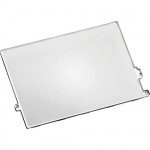


 . I just got it the other day and have not had an opportunity to do much beyond transfer my equipment into it. My initial thoughts are “very roomy” and love the style. But I will post a full review once I have had a chance to take it on a few shoots and test it out.


